Online tone generator
A free online tone generator that plays any audio frequency from 20 Hz to 20,000 Hz in your browser. Pick a sine, square, triangle or sawtooth wave, drag the slider or type an exact value in hertz, and use the presets for tuning, calibration, bass checks and high-frequency listening. This tool plays sound — to measure how loud something is, use the sound level test.
Built by Nayeem, Software Developer of SoundLevelTest.com
Published:
Latest update: First publication: browser tone generator with sine, square, triangle and sawtooth waves, 20 Hz to 20 kHz control, acoustic presets, a live waveform view and an original waveform harmonic and frequency band diagram.
Generate a tone
Start at a low level. A sustained pure tone is far more tiring than music at the same setting, and high levels through headphones can damage hearing.
Waveform
One pure frequency, no harmonics
Live waveform
The trace shows the shape of the signal being sent to your speakers. It is not a measurement of what the speakers actually produce.
Channel
Presets
Tuning
Calibration and speech
Sub-bass and woofers
High-frequency hearing
Questions people ask
What is an online tone generator?
An online tone generator plays a single, steady audio frequency through your speakers or headphones straight from a web page. You choose the frequency in hertz and the wave shape, and the browser synthesises the sound. Nothing is downloaded or recorded, so it is a quick way to test audio gear, tune an instrument or check hearing range.
What frequency range does this tone generator cover?
It covers 20 Hz to 20,000 Hz, the range usually quoted for human hearing. The slider moves logarithmically so each octave takes the same amount of travel, and the number box accepts an exact value to one decimal place when you need a precise reference like 440 Hz or 997 Hz.
Which waveform should I choose?
Choose a sine wave when you want one clean frequency with no harmonics, which suits tuning, hearing checks and calibration. Square and sawtooth waves add strong harmonics and sound harsher, which makes buzzes, rattles and distortion easier to notice. Triangle sits between the two and is gentler to listen to.
How do I use a 440 Hz tone to tune an instrument?
Play the 440 Hz sine preset, which is concert pitch A4, and sound the same note on your instrument. When the two pitches are close you hear a slow pulsing beat; adjust until the beating stops and the two tones merge into one steady sound. Keep the level modest so you can hear both clearly.
Can I test my hearing range with this tool?
You can get a rough idea by raising the frequency slowly and noting where the tone stops being audible. It is not a hearing test. Your speakers, headphones, room and volume setting all affect the result, and most adults stop hearing tones somewhere between 14 kHz and 17 kHz as a normal part of ageing.
Why can I not hear low frequencies like 30 Hz?
Most laptop, phone and small monitor speakers produce almost nothing below roughly 60 Hz, so a 30 Hz tone may be silent or audible only as a faint buzz from the case. That is normal and does not mean the speaker is faulty. A subwoofer or full-size headphones are needed to reproduce the lowest octave.
Is the tone generator free and private?
Yes. It runs entirely in your browser using the Web Audio API, with no account, no install and no payment. It only plays sound and never uses your microphone, so no audio is recorded, stored or sent anywhere.
Can a test tone damage my speakers or hearing?
A sustained tone at a high level can do both, which is why this page starts quiet and fades every tone in and out instead of switching abruptly. Keep the level comfortable, avoid long sessions at high frequencies, and lower the volume before trying deep bass tones, which make small drivers distort.
What is a 1 kHz tone used for?
A 1,000 Hz tone is the common reference point in audio and acoustics. Sound level meters are calibrated around it, A-weighting treats it as the baseline, and engineers use it to check levels and line-up between devices. It is also a useful starting point when comparing left and right channels.
How is this different from the speaker test?
This page holds one chosen frequency for as long as you want, which suits tuning and precise checks. The speaker test runs set routines instead: a left and right channel check, a continuous 20 Hz to 20 kHz sweep, and pink or white noise for comparing the two sides.
What each waveform sounds like
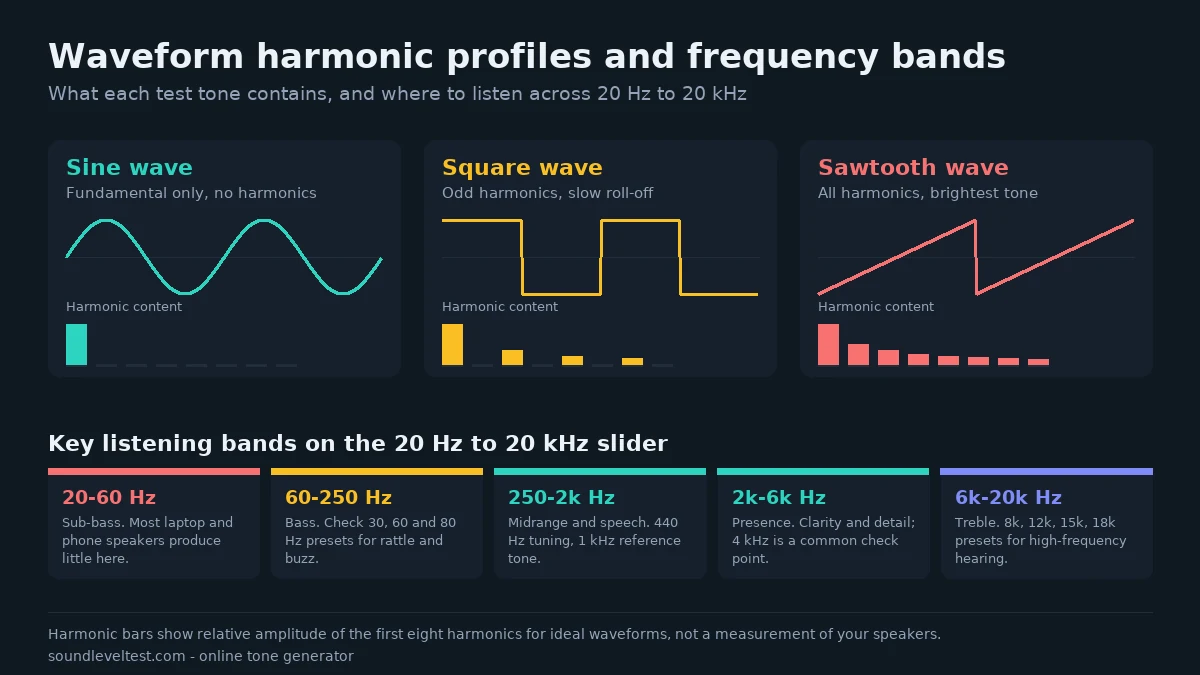
A sine wave is a single frequency and nothing else, which is why it sounds smooth and slightly dull. A square wave contains the odd harmonics above the fundamental and sounds hollow and reedy. A sawtooth contains every harmonic and is the brightest and buzziest of the four. A triangle wave also uses odd harmonics but they fall away quickly, so it sits between sine and square in character.
For anything that needs accuracy — tuning, a hearing check, comparing two channels — use the sine wave, because any roughness you hear then comes from the equipment rather than from the signal. Switch to square or sawtooth when you are hunting for a rattle, since the extra harmonics excite far more of the cabinet, desk or earbud housing.
Tuning an instrument
Use 440 Hz for standard concert pitch A4, or 432 Hz if you are following that alternative tuning. Listen for the slow beating between your instrument and the tone, and tune until the beating disappears.
Checking a subwoofer or bass response
Start at 80 Hz at a low level and work down through 60 Hz to 30 Hz. The tone should stay clean and simply get deeper. A buzz or a sharp edge usually comes from the cabinet, a loose grille or the surface the speaker sits on rather than from the driver itself.
Exploring your high-frequency hearing
Set the level low, then step up through 8 kHz, 12 kHz, 15 kHz and 18 kHz. Where the tone disappears gives a rough idea of your upper limit, but treat it as curiosity rather than diagnosis: cheap drivers roll off early and a quiet room changes the answer. A real concern about your hearing belongs with an audiologist.
Listening safely
A pure tone carries all its energy at one frequency, so it feels louder and more fatiguing than music at the same setting. NIOSH recommends keeping daily exposure at or below 85 dBA over eight hours, with the safe time halving for every 3 dB above that. Keep sessions short, start quiet, and never raise the level to "make sure" a very low or very high tone is there — many speakers simply cannot produce it. See how loud is too loud for the full exposure guidance.
What this tool cannot do
The browser has no reference for what actually leaves your speakers, so this page cannot measure frequency response, distortion or output level. The live waveform shows the signal being generated, not the sound in the room. Perceived loudness also changes with frequency, so a 40 Hz tone sounds much quieter than a 1 kHz tone at an identical setting without anything being wrong. Our measurement methodology explains the limits of browser audio in more detail.